Frequently Asked Questions
If you encounter any issues while using Tencent WorkBuddy, you can find solutions on this page. If your issue remains unresolved, we recommend sending an inquiry to workbuddy@tencent.com.
General
Q: What is Tencent WorkBuddy?
Tencent WorkBuddy is an AI-powered desktop workstation that can understand natural language instructions, autonomously plan and execute tasks, and deliver verifiable results including documents, reports, code, and more.
Q: What platforms does Tencent WorkBuddy support?
Tencent WorkBuddy is available for macOS (Apple Silicon and Intel) and Windows (x64 and ARM64).
Q: Do I need to be online to use Tencent WorkBuddy?
Yes, an internet connection is required for Tencent WorkBuddy to communicate with AI model services.
Account & Authentication
Q: How do I sign in?
Tencent WorkBuddy supports Google OAuth and GitHub OAuth for authentication. Click "Sign In" and choose your preferred method.
Q: Can I use Tencent WorkBuddy on multiple computers?
Yes, sign in with the same account on any number of devices. Your account settings sync across devices.
Assistant Remote Control
Q: Which messaging platforms does Assistant support?
Assistant currently supports Slack, Telegram, and Discord.
Q: Does my computer need to be on for Assistant to work?
Yes, Tencent WorkBuddy must be running on your computer to receive and execute remote tasks via Assistant.
Skills & Connectors
Q: Are skills free to use?
Most community skills are free. Some skills may require separate API keys for third-party services they connect to.
Q: How do I update skills?
Tencent WorkBuddy notifies you when skill updates are available. You can update individually or batch-update all skills.
Troubleshooting
Q: Tencent WorkBuddy is slow to start.
The first launch after installation or update may take 30-60 seconds. Subsequent launches should be faster.
Q: A task seems stuck.
Click the Stop button to interrupt the current execution, then provide modified instructions or retry.
Q: My results look wrong.
Provide more specific instructions in a follow-up message. Include examples of expected output when possible.
Q: Where to view logs?
Mac: Open Tencent WorkBuddy, click Help -> Open Log Folder at the top, and find the corresponding log (.zip) archive.
Windows: Open Tencent WorkBuddy, click the Help dropdown in the top-left corner, and select Open Log Directory. The archive file inside is the log file.
Q: Where to report product issues found in logs or functional abnormalities encountered during use?
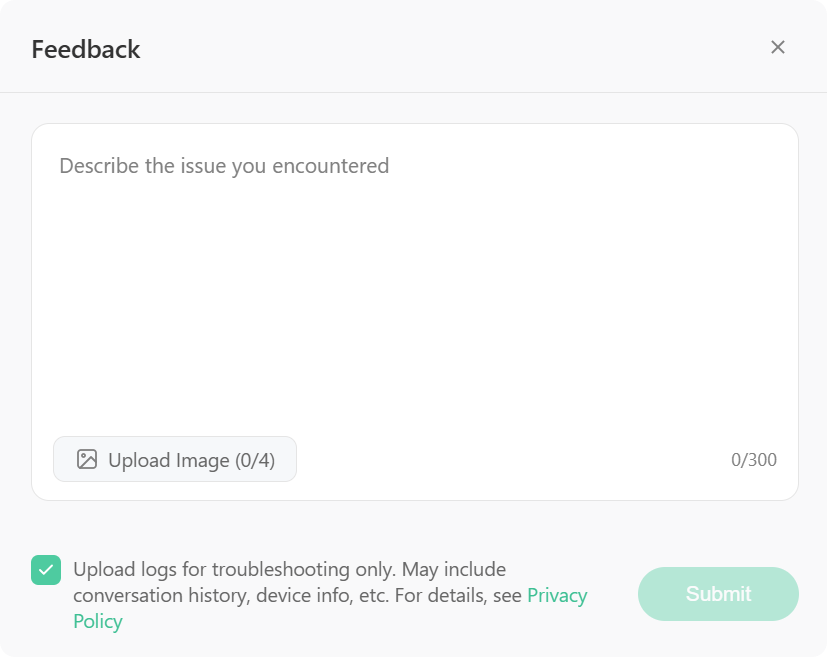
- Open Tencent WorkBuddy, click your avatar in the bottom-right corner, and go to Settings - Help & Feedback - Feedback.
- On the Feedback page, describe the issue you encountered, upload screenshots, check Upload Logs, and click Submit.
TIP
Logs are used solely for troubleshooting and may contain data such as conversation records and device information. For details, please refer to the Privacy Protection Statement.