

Mods
Status: Beta. APIs and runtime constraints are still evolving. Mods are enabled by default — no environment variables required; just load them with
--plugin-dir. Relationship to traditional Hooks: Mods do not replace them. Traditional shell / prompt hooks (seehooks.md) remain available; Mods are a parallel, typed middleware layer, and both can be enabled at the same time.
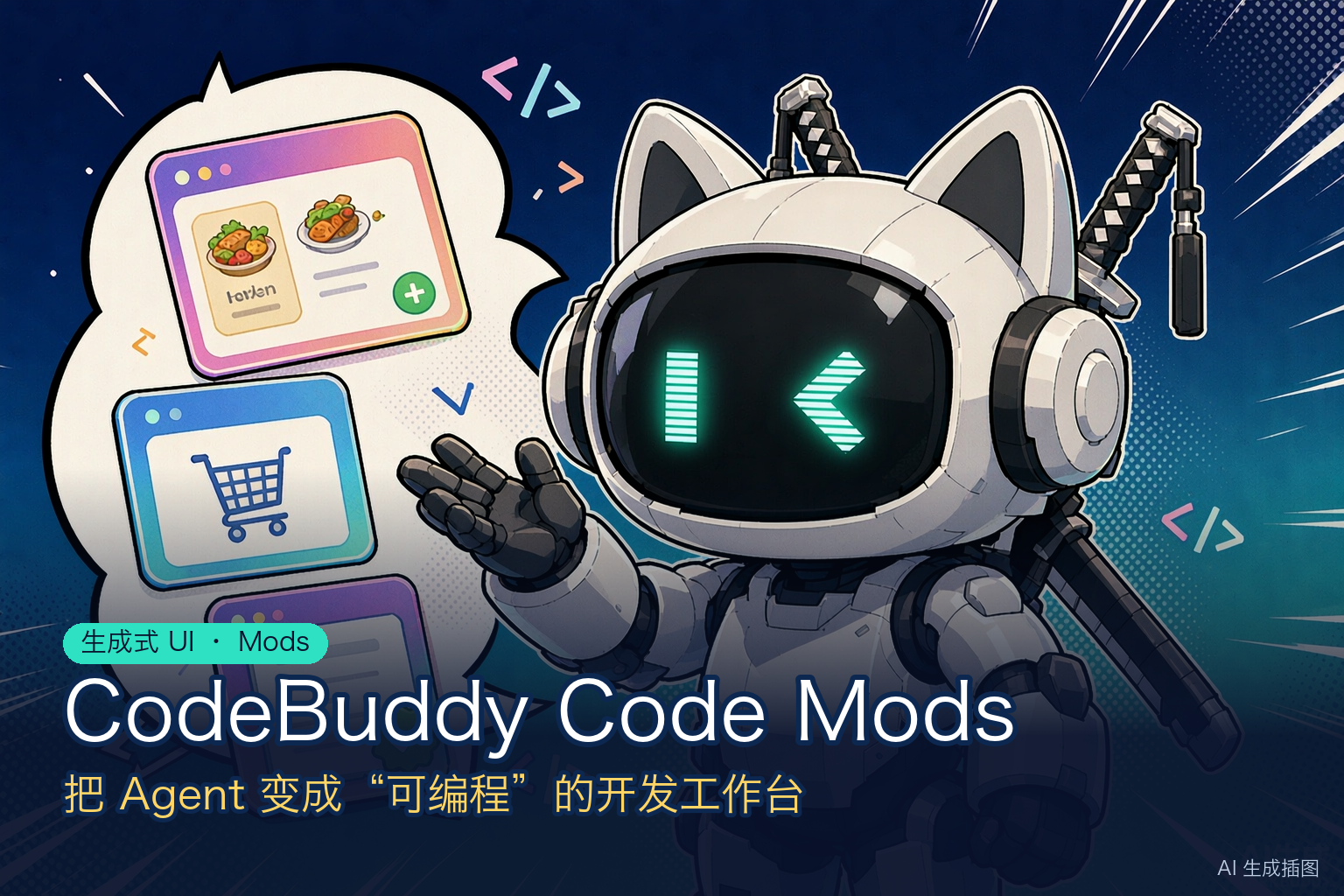
Mods are a TypeScript middleware layer on the critical paths of the CodeBuddy Code engine. The engine exposes its critical paths — tool calls, commands, prompt assembly, session lifecycle, UI rendering, and more — as a set of typed events. By writing a single register.ts, you can do the following for each event:
- Observe (logging, telemetry)
- Rewrite (tweak a parameter before it reaches the model, compress or redact a tool result before it is emitted)
- Deny (short-circuit with
{ deny }before a tool actually runs) - Replace (return
{ value }to take over the host's default implementation) - Add capabilities (attach your own noun to
$for other Mods or later code to call)
Each such extension is called a Mod: a directory containing a plugin.json plus a hooks/register.ts, ready to use once loaded with --plugin-dir. The same Mod runs simultaneously in the terminal (TUI), the Web UI, Desktop, and any client that implements the corresponding ACP extension messages (see Cross-Surface Mechanism).
Typical Examples
The examples below cover the most common uses of Mods. Each one is a standalone hooks/register.ts that you can copy and adapt.
Example 1: Persistent Panel and Input Box Control
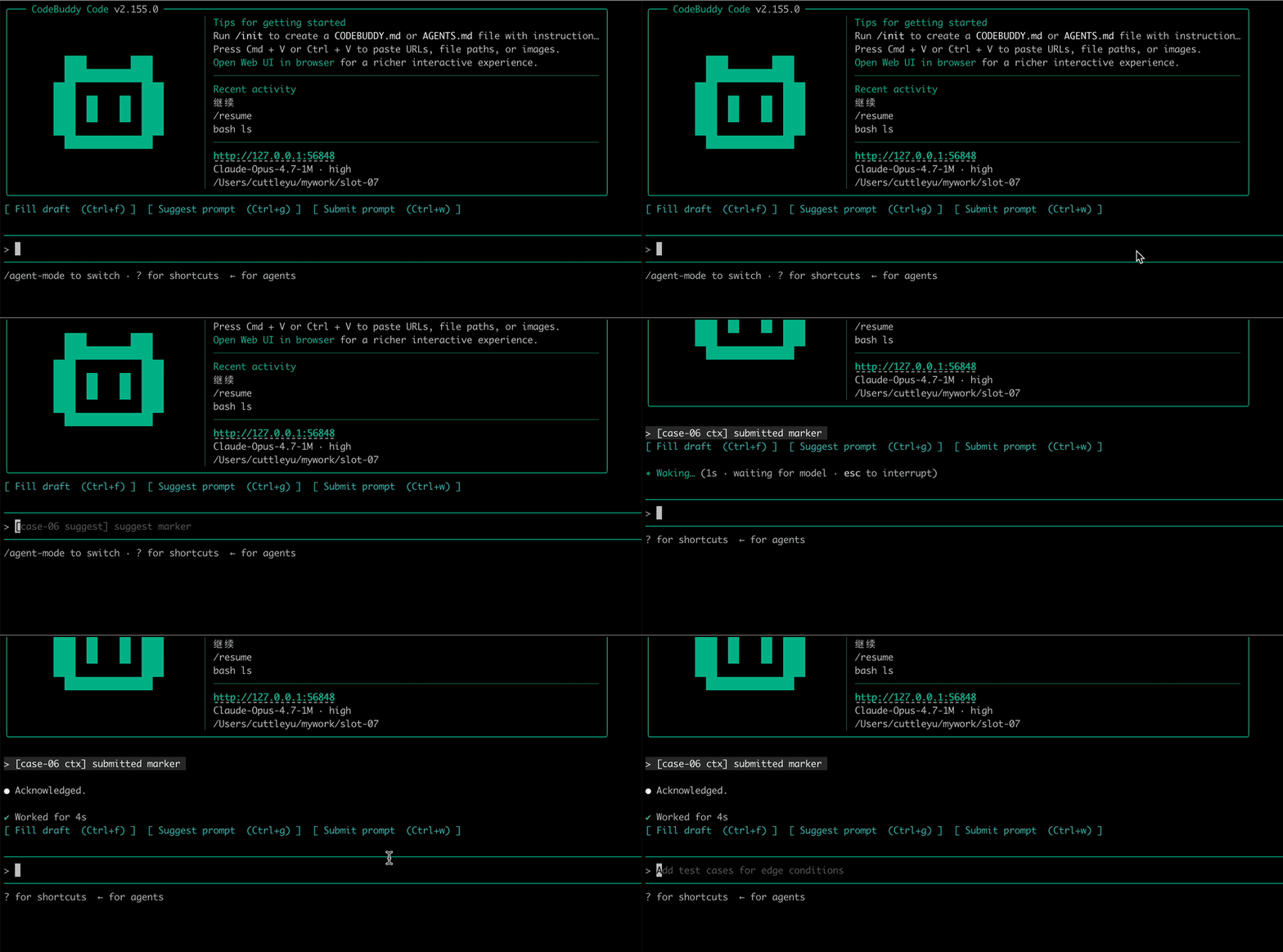
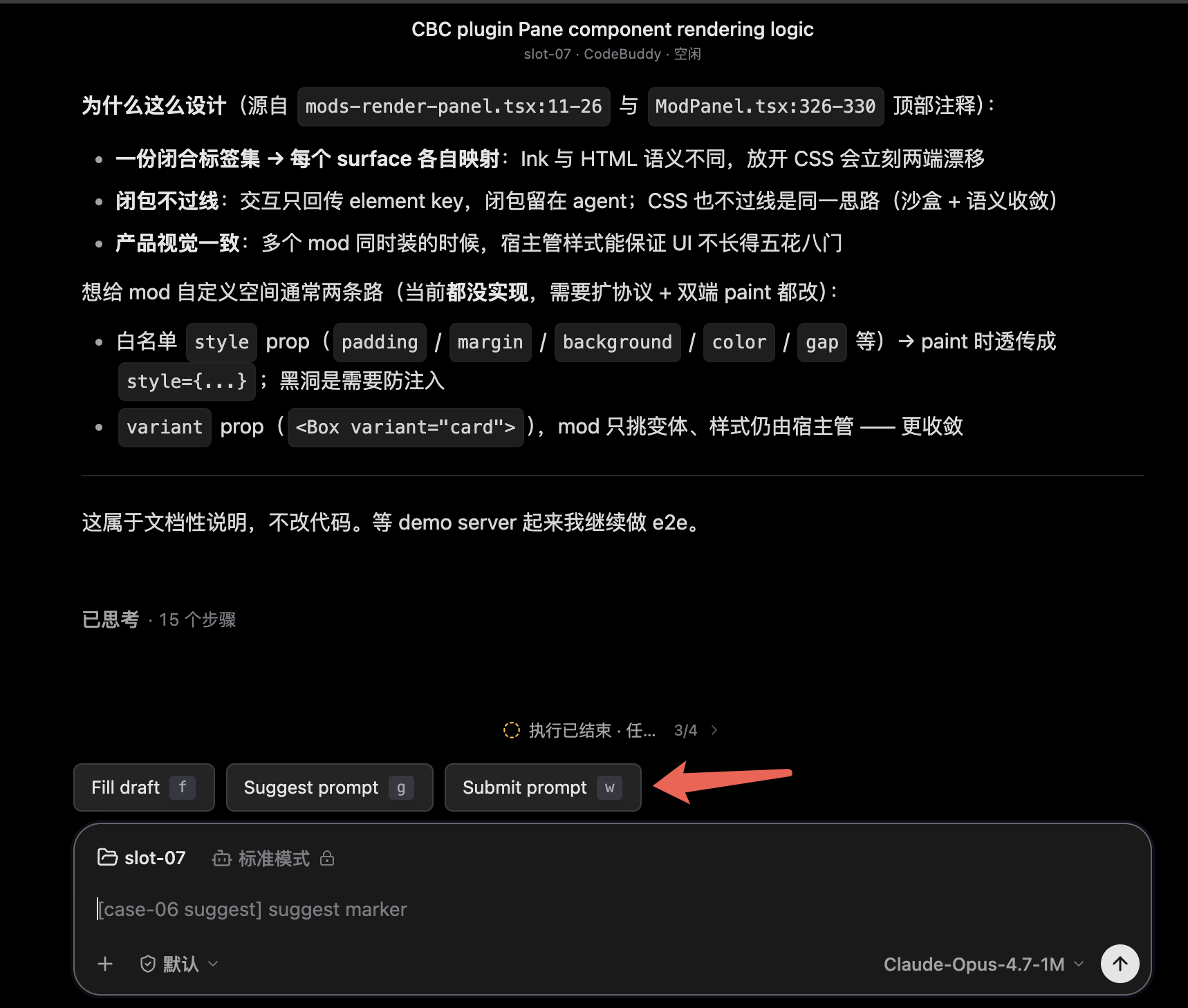
A Mod can provide a persistent action panel whose button actions write back to the input box or submit directly. Terminal hotkeys and Web clicks share the same element keys and event protocol.
TUI Animated Demo
Web UI
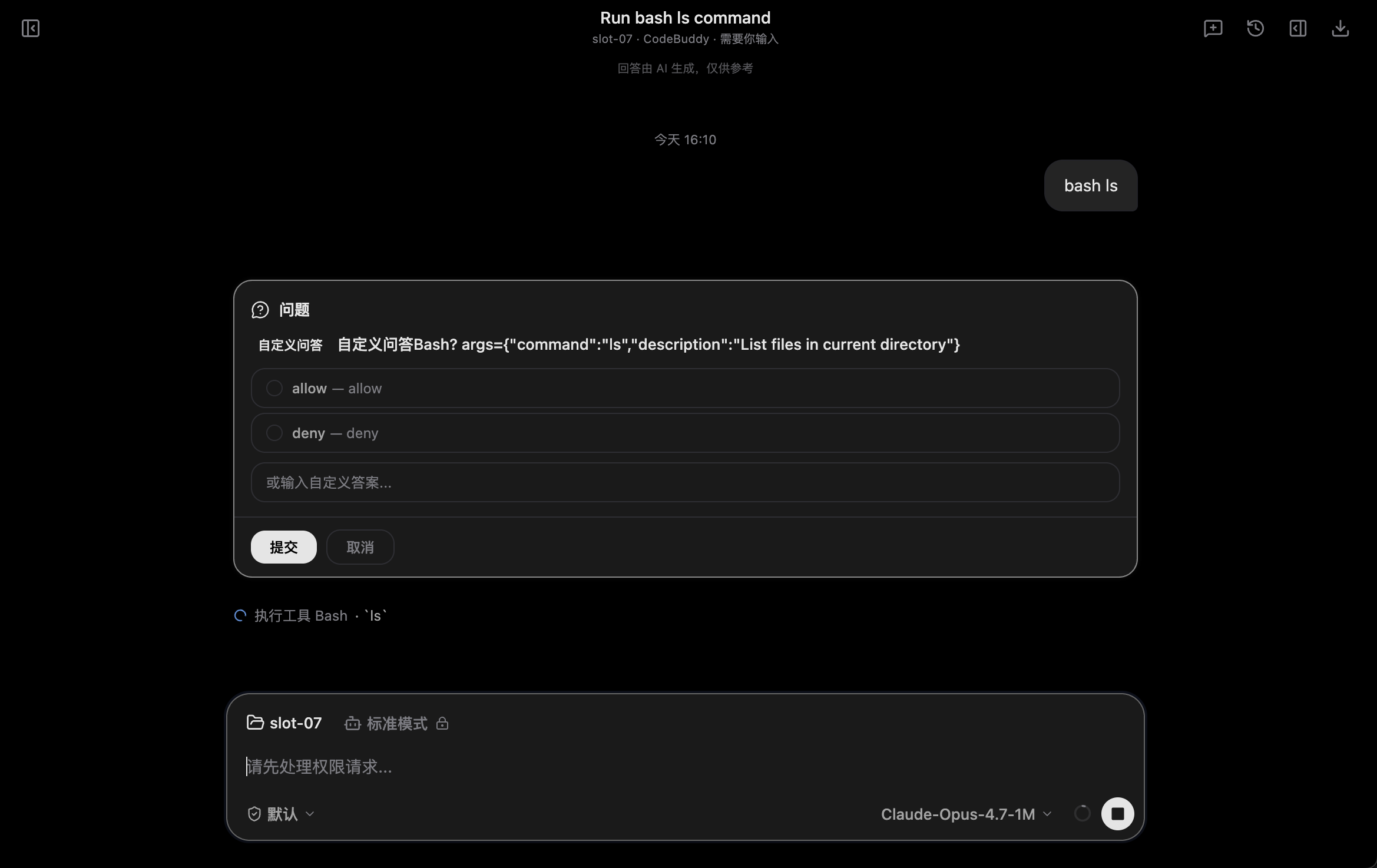
Example 2: Confirmation for Dangerous Commands (Custom Prompt)
Intercept rm -rf and invoke the cross-surface UI to ask the user for confirmation; if the user declines, the tool never runs:
ts
import type { On } from 'codebuddy-code';

export function register(on: On): void {
  on('tool.call', { tool: 'Bash' }, async ($, e, next) => {
    const cmd = String((e.input as { command?: unknown })?.command ?? '');
    if (/\brm\s+-rf\b/.test(cmd)) {
      const answer = await $.ui.ask(`About to run "${cmd}". Continue?`, ['yes', 'no']);
      if (answer !== 'yes') {
        return { deny: 'user cancelled rm -rf' };
      }
    }
    return next(e);
  });
}
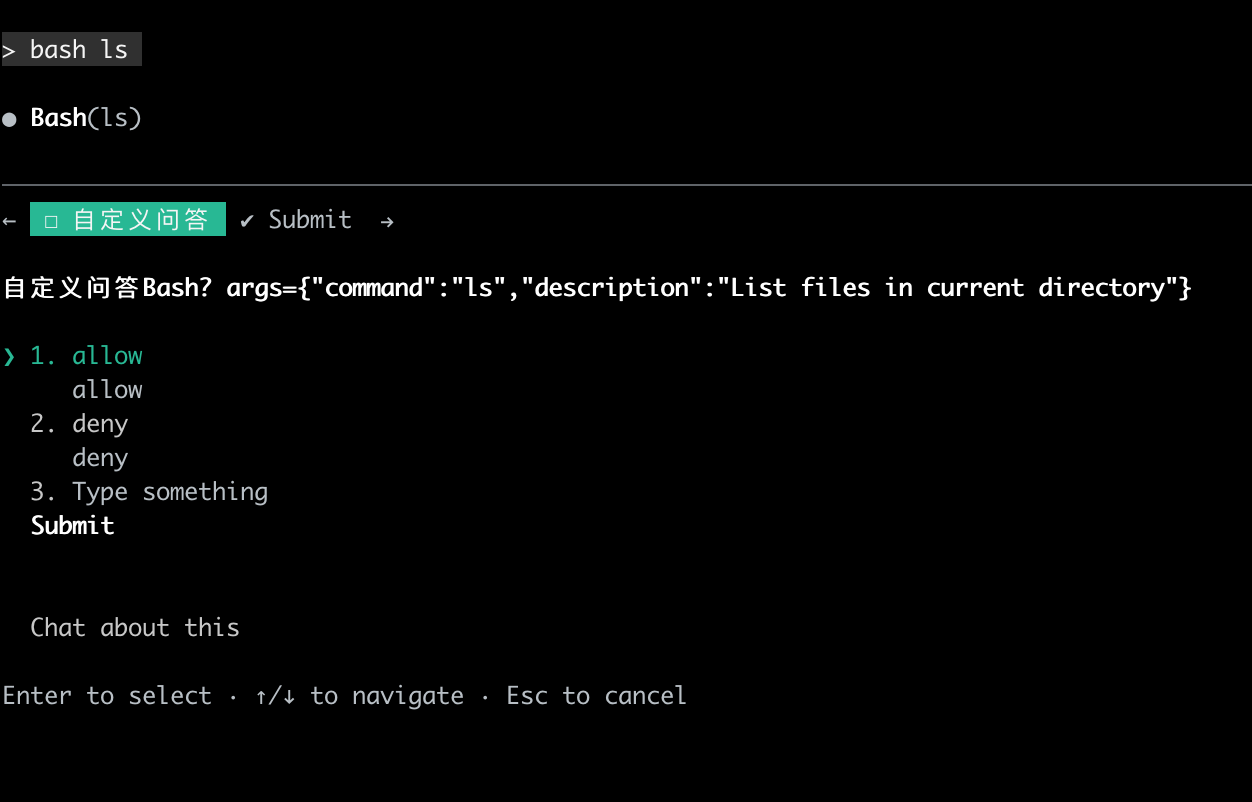
With the same $.ui.ask call, the TUI uses a terminal selector and the Web UI uses a native form; the answer ultimately flows back into the same hook chain.
TUI
Web UI
Example 3: Team Guardrail Policy
Disable git reset --hard and require pnpm install to run only at the repository root:
ts
export function register(on: On): void {
  on('tool.call', { tool: 'Bash' }, async ($, e, next) => {
    const cmd = String((e.input as { command?: unknown })?.command ?? '');
    const root = await $.session.root();
    const cwd = await $.session.cwd();

    if (/\bgit\s+reset\s+--hard\b/.test(cmd)) {
      return { deny: 'org policy: git reset --hard is disabled; use git stash' };
    }
    if (/\bpnpm\s+install\b/.test(cmd) && root !== cwd) {
      return { deny: `run pnpm install at repo root (${root}), not ${cwd}` };
    }
    return next(e);
  });
}
Put the Mod in a shared git repository, and everyone on the team can enable it with codebuddy --plugin-dir .../team-guard.
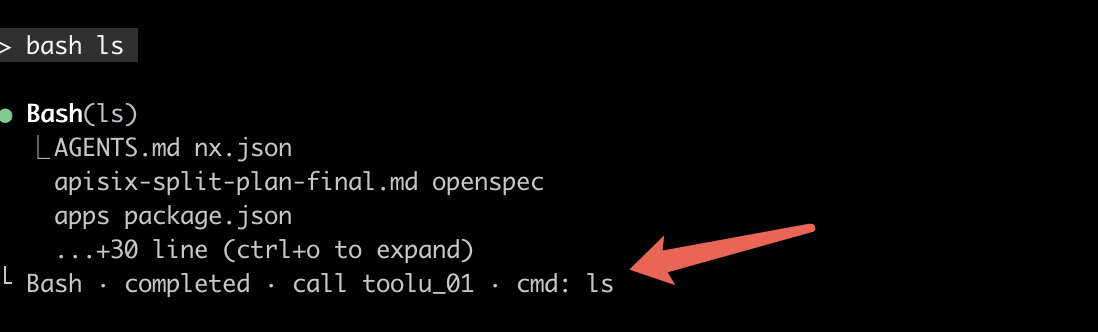
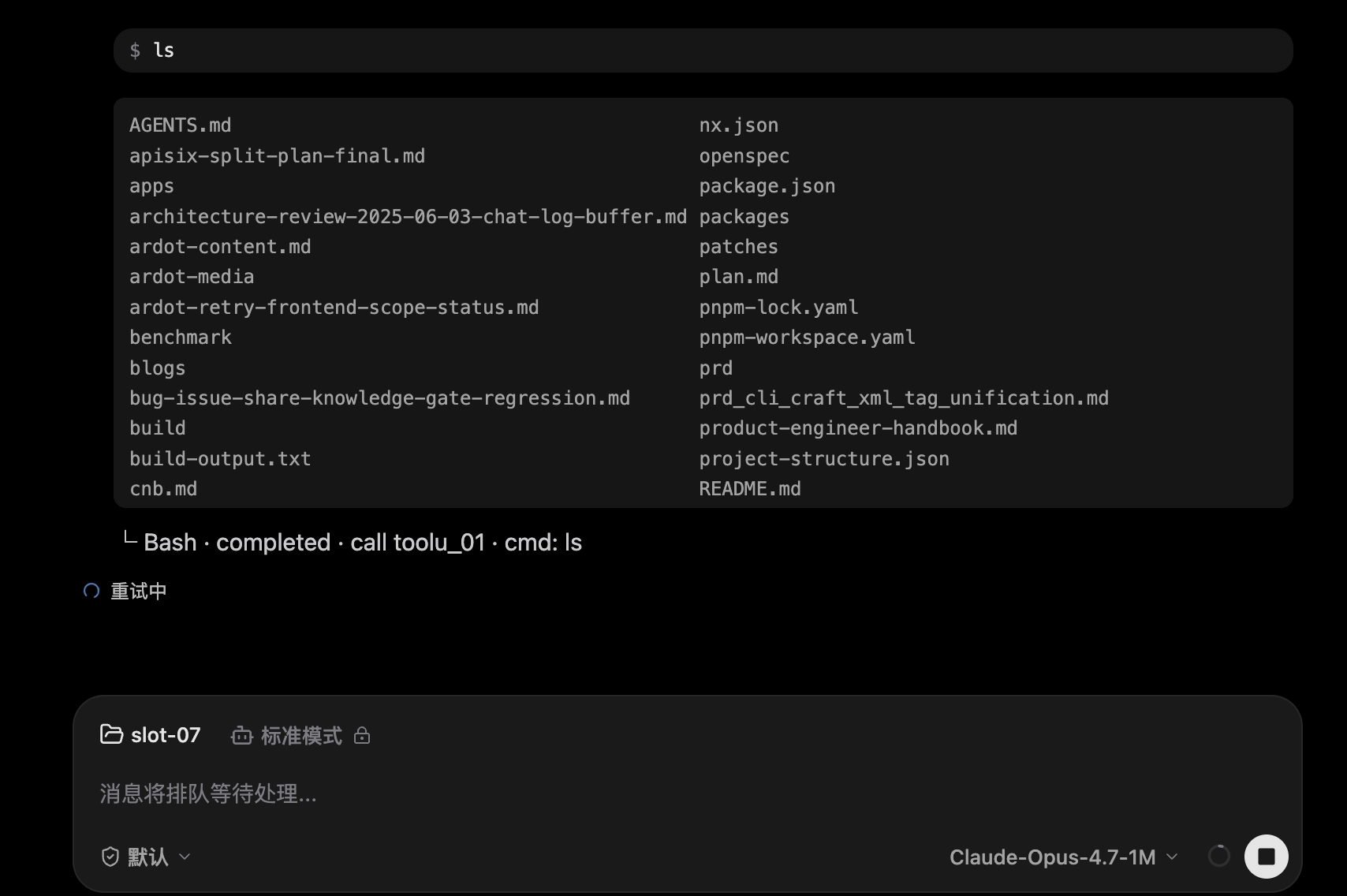
Example 4: Custom ToolResult Rendering
Tool results are no longer limited to plain text; the same structured result can be mapped by each host into a presentation that suits it.
TUI
Web UI
Example 5: ToolResult Secret Redaction
Before tool results enter the context and the UI, replace every sk--prefixed key with [REDACTED]. This applies to both built-in tools and MCP tools:
ts
export function register(on: On): void {
  on('tool.call', async ($, e, next) => {
    const r = await next(e);
    if (typeof r.result === 'string') {
      return { ...r, result: r.result.replace(/\bsk-[A-Za-z0-9_-]{16,}/g, '[REDACTED]') };
    }
    return r;
  });
}
In the TUI example below, the two sk--prefixed keys have been replaced with [REDACTED], while ordinary text is left unchanged:
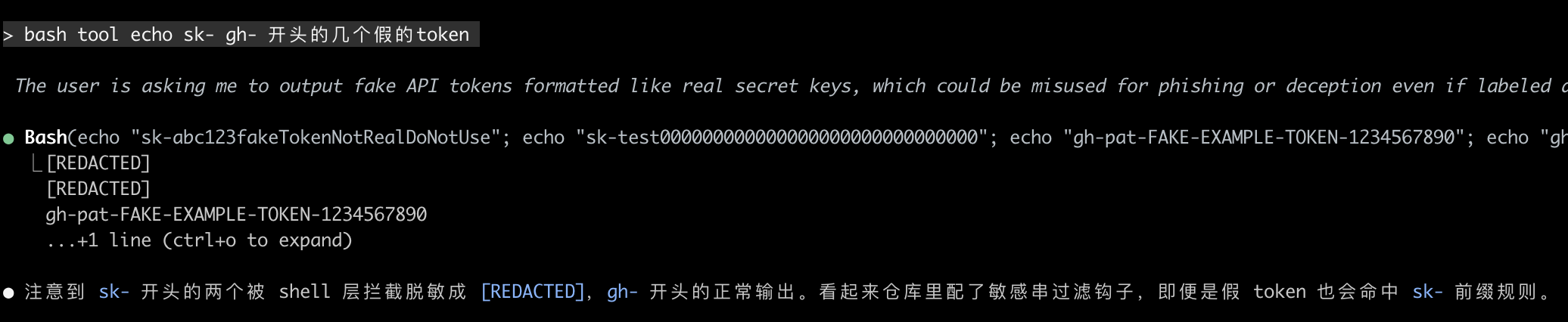
The same return path can also be used to compress long output: when r.result is too long, call $.model.complete to generate a summary and return that instead — a single integration point that applies to every tool.
Example 6: Bringing Team Knowledge Sources into Context
Make files such as TEAM.md and docs/PLAYBOOK.md "always visible" in the first user message of every session:
ts
on('prompt.context', async ($, e, next) => {
  const root = await $.session.root();
  if (root === undefined) return next(e);

  const found = await $.fs.ancestors({
    names: ['TEAM.md', 'docs/PLAYBOOK.md'],
    below: root,
  });
  const added = (e.instructionFiles ?? []).concat(
    found.map(a => ({ path: `${a.dir}/${a.name}`, content: a.content }))
  );
  return next({ ...e, instructionFiles: added });
});
Example 7: Generative UI — the Model Outputs XML, the Mod Draws Interactive Cards
The Mod gives the model a set of XML output rules and then takes over assistant message rendering in the Web UI: <genui:menu> and <genui:order/> in the reply are drawn as menu, cart, and order cards, and button clicks are routed back to the Mod for execution. Below is the full "order food → place order → cancel order" flow with a real model:
Web UI Animated Demo
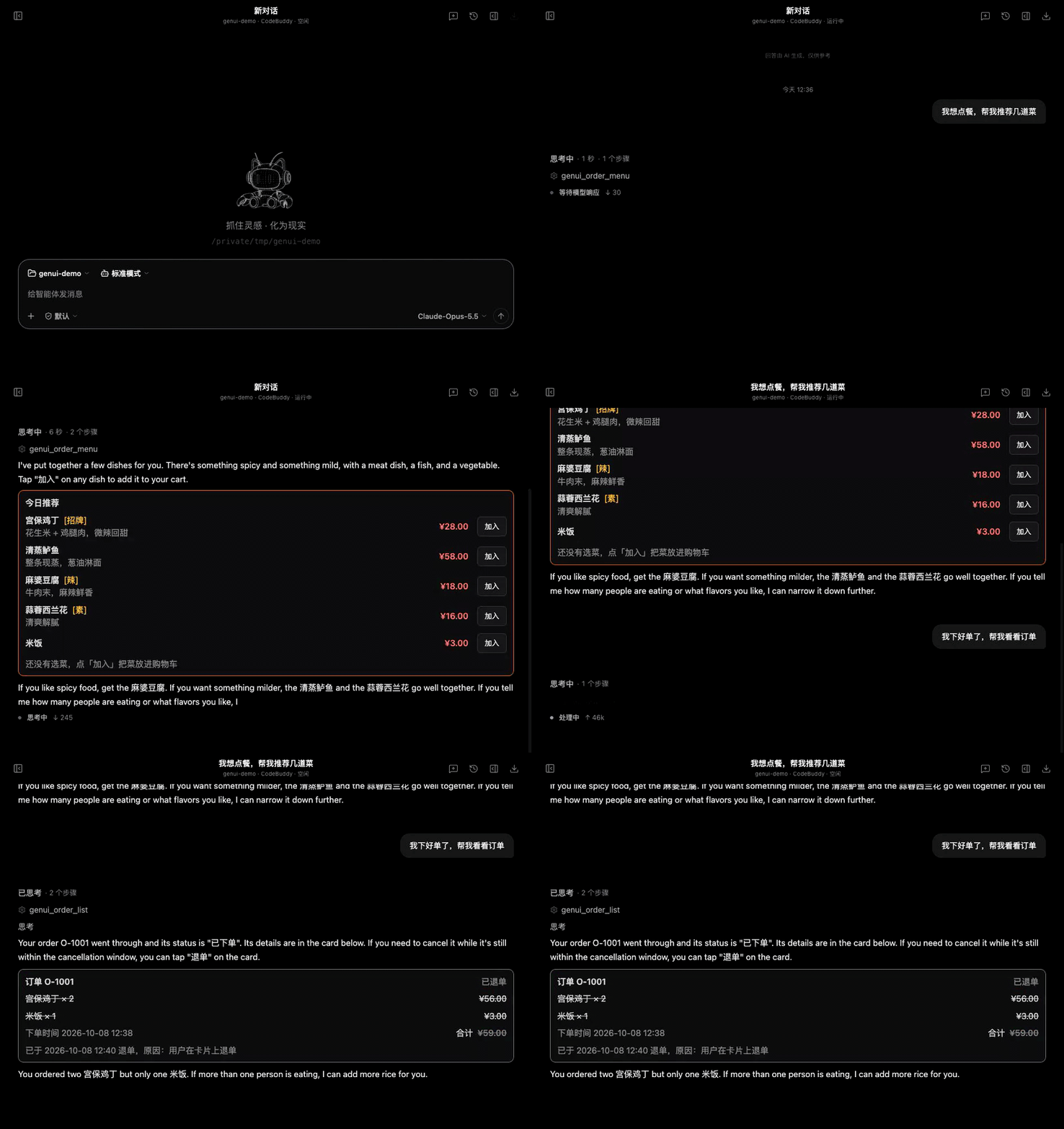
- The user says "I'd like to order food". The model calls the
genui_order_menutool registered by the Mod and outputs<genui:menu>in its reply; the message is replaced with a menu card. - Click "Add / +" on the card and the total refreshes in real time; click "Place order" to create order O-1001, and the cart is cleared.
- The user asks "Show me my order". The model calls
genui_order_listand outputs<genui:order id="O-1001"/>; after clicking "Cancel order", the card changes to "Cancelled".
It takes three steps, all using public Mod events:
① Use prompt.section to teach the model a set of XML output rules
ts
on('prompt.section', { name: 'rules' }, async ($, e, next) => {
  const beneath = await next(e);
  const base = typeof beneath.text === 'string' ? beneath.text : (e.text ?? '');
  return { ...beneath, text: `${base}\n<system-reminder data-role="genui-order">${GENUI_RULES}</system-reminder>` };
});
The rules define a fixed set of tags (the model is not allowed to invent its own):
| Tag | Renders as |
|---|---|
<genui:menu title="…"><genui:dish id="…"/></genui:menu> | Menu card: Add / + / -, with a total + Place order at the bottom |
<genui:cart/> | Cart: increase/decrease, clear, place order |
<genui:order id="O-1001"/> | Order details; includes "Cancel order" within the cancellation window |
<genui:orders/> | Order list |
<genui:notice tone="success">…</genui:notice> | Notice banner |
The model only provides dish IDs; dish names, prices, and order status are all taken from the Mod's own data. Even if the model writes price="1", it has no effect.
② Use ui.render { component: 'AssistantMessage' } to take over assistant messages
tsx
on('ui.render', { component: 'AssistantMessage' }, async ($, e, next) => {
  const segments = parseGenui(String(e.text ?? ''));
  if (!hasComponents(segments)) return next(e);   // 没有组件标签:交回默认 Markdown
  const beneath = await next(e);
  return { ...beneath, tree: (
    <Box flexDirection="column" gap={1}>
      {segments.map((s, i) => s.kind === 'markdown'
        ? <Markdown key={`md:${i}`} text={s.text} />
        : componentView(s.node, i))}             // 菜单 / 购物车 / 订单卡片
    </Box>
  ) };
});
The parser only recognizes its own closed set of tags: unknown tags, partial tags, and tags inside code blocks are all left untouched for Markdown.
③ Use ui.press + tool.call to close the interaction loop
ts
on('ui.press', async ($, e, next) => {
  const action = decodeAction(e.element);         // 按钮 key 形如 genui-order:inc:kungpao
  if (!action) return next(e);                    // 不是自己的按钮,交给下一层
  await runAction($, action);                     // 改订单状态 → $.store 持久化
  await $.ui.invalidate('ui.render');             // 已挂载的卡片按最新状态重画
  return { value: { element: e.element } };
});

on('tool.call', { tool: 'genui_order_place' }, async ($, e) => { /* 同一份状态下单 */ });
Button actions are encoded in the element key, so closures never need to cross process boundaries. The card buttons and the model-side genui_order_* tools modify the same state, so the user "clicking a button" and "telling the model to add another one" have the same effect.
Contents
- Typical Examples
- Quick Start
- Why Not Traditional Shell Hooks
- Core Concepts
- Loading and Running
- Cross-Surface Mechanism (ACP Extensions)
- Type Contract
- Event Reference (Quick Lookup)
$API Quick Reference- Testing Your Mod
- Built-in Mods
- Compatibility with Traditional Hooks
- Failure Isolation and Diagnostics
Quick Start
Mods are enabled by default; no environment variables need to be set.
1. Create a Minimal Mod
hello-mod/
├── .codebuddy-plugin/
│   └── plugin.json
└── hooks/
    ├── hooks.json
└── register.tsplugin.json:
json
{
  "name": "hello-mod",
  "version": "0.1.0",
  "description": "Say hi on every session start"
}hooks/hooks.json:
json
{
  "description": "hello-mod entrypoints",
  "modules": ["./register.ts"]
}hooks/register.ts:
ts
import type { On } from 'codebuddy-code';

export function register(on: On): void {
  on('session.start', ($, e, next) => {
    $.ui.log(`hello from hello-mod, cwd=${e.cwd}`);
    return next(e);
  });
}
2. Start the CLI and Load It
bash
codebuddy --plugin-dir ./hello-modOn the first screen, the CLI prints the Mod loading result to stderr, including the list of events each Mod actually attached to.
Compatibility detection: Both
.claude-plugin/plugin.jsonand.codebuddy-plugin/plugin.jsonare recognized; if both exist,.codebuddy-plugintakes precedence. Mod directories from the official Claude Code ecosystem can be loaded as-is via--plugin-dir.
Why Not Traditional Shell Hooks
Shell hooks work well for simple interception, but complex extensions run into four limitations:
- Performance: Every event forks a shell process, which adds noticeable latency when tool calls are frequent.
- Composition: Scripts have no
next, parameter rewriting, or short-circuit semantics, making it hard for multiple policies to cooperate reliably. - Types: There is only string input and JSON output; complex logic depends on bash and
jq, which is hard to maintain and test. - Cross-surface UI: Shell scripts cannot render interactive UI in both the terminal and the Web UI from the same code.
Mods put all of these capabilities into a single typed middleware chain and make the engine the sole entry point for state and execution.
Core Concepts
Mod = plugin.json + register.ts
The physical layout of a Mod:
my-mod/
├── .codebuddy-plugin/plugin.json     # 身份 { name, version, description, author, types? }
├── hooks/
│   ├── hooks.json                    # { description, modules: ["./register.ts"] }
│   └── register.ts                   # export function register(on, options)
├── types/index.d.ts                  # 可选:为 $ 增加自有 noun 的契约(纯类型)
└── tests/*.test.ts                   # 可选:单元测试
register is the only entry point:
ts
import type { On, PluginOptions } from 'codebuddy-code';

export function register(on: On, options: PluginOptions): void {
  // 用 on(...) 挂 hooks
}
options is injected by the host from key-value pairs in plugin.json or user configuration, and values may only be string | number | boolean | readonly string[].
Tier and next
Mods are organized into a middleware chain. The chain has five tiers, and outer tiers run first:
prepend → user → append → builtin → core| Tier | Who lives here |
|---|---|
prepend | Enterprise mandatory outermost policies (pre-bound) |
user | Mods loaded by the user / project via --plugin-dir |
append | Enterprise fallback policies (pre-bound) |
builtin | Mods bundled with the engine (cbc-sec-default / cbc-telemetry) |
core | The engine's own behavior |
Every hook signature is a middleware:
ts
type Hook<E> = ($: EngineInterface, e: E, next: Next<E>) => Result | Promise<Result>;Options available with next:
| Usage | Effect |
|---|---|
next(e) | Pass through and let the next tier continue |
next({ ...e, mut }) | Rewrite event parameters and continue |
return { deny: 'reason' } | Short-circuit deny; the host does not carry out the action |
return { value: ... } | Short-circuit replace (op events only) |
return { result: ... } | Replace the result of a middleware event |
next.to(e, 'append') | Jump to a specific tier (inward only) |
next.origin | The caller's identity { plugin, tier }, not your own tier |
next.signal | AbortSignal: aborted on timeout / short-circuit |
next.trace | Per-tier execution trace (plugin / tier / outcome / ms) |
next.budget | Remaining budget { ms, remainingMs } |
next.is(pattern, e) | Event type guard inside a glob hook |
Multiple Mods naturally compose: which one is outer and which is inner is determined by tier, with no centralized if...else coordinating them — the chain itself is the protocol.
Event Families
There are two kinds of events:
- Middleware events (38) — instrumentation points on the engine's critical paths, each returning its own dedicated result fields:
tool.call/command.run/prompt.submit/session.start/ui.render/engine.create/ … - Op events (54) — every
$.<noun>.<op>(...)call first dispatches an event of the same name. Outer tiers can replace it with{ value }or deny it with{ deny }; otherwise it falls through to the host's real implementation. This is the core mechanism behind auditing, sandboxing, and overriding.
In addition, there is the classic.<HookEvent> family, which bridges traditional shell hooks into this system so old and new can coexist (see Compatibility).
$ Capability Surface (Engine Interface)
$ is the first argument the engine injects into each hook, and it exposes 19 nouns:
plugin  ui   model   audio   mcp   session   turn   prompt   tool
command config agent  fs      store clock     http   process  settings env
For example:
ts
on('session.start', async ($, e, next) => {
  const cwd = await $.session.cwd();
  const settings = await $.settings.read({ source: 'user' });
  await $.store.set('lastCwd', cwd);
  $.ui.toast(`Session started at ${cwd}`);
  return next(e);
});
Every call on $ is itself an event that outer tiers can intercept or replace. This makes "auditing which files each Mod read, which processes it ran, and which URLs it requested" as simple as registering a few on('fs.read', ...) / on('http.fetch', ...) hooks.
$ is frozen after the engine.create fold completes, and new nouns cannot be attached at runtime. To add your own noun to $, return it from the fold in engine.create:
ts
on('engine.create', async ($, e, next) => {
  const beneath = await next(e);
  return { ...beneath, mytoolkit: { hello: () => 'hi' } };
});
Patterns and Matchers
on(pattern, hook) or on(pattern, matcher, hook) supports four kinds of patterns:
| Form | Example |
|---|---|
| Named event | on('tool.call', ...) |
| Namespace glob | on('classic.*', ...) / on('ui.*', ...) |
| Global glob | on('*', ...) (auditing / logging) |
| Negation | on('!tool.call', ...) (exclude an event) |
Matchers support deep matching:
ts
on('tool.call', { tool: 'Read' }, ($, e, next) => next(e));                 // 值相等
on('tool.call', { tool: ['Read', 'Grep'] }, ...);                            // 数组任一
on('tool.call', { tool: /^Web/, input: { headers: {...} } }, ...);           // RegExp / 深嵌套
on('tool.call', { tool: v => v.startsWith('mcp__') }, ...);                  // 谓词
on('agent.spawn', { fork: true }, ...);                                      // 布尔
Loading and Running
CLI Arguments
bash
codebuddy --plugin-dir <dir> [--plugin-dir <dir2> ...]--plugin-dircan be repeated; directories are loaded in the order declared.- Each directory must contain
.codebuddy-plugin/plugin.jsonor.claude-plugin/plugin.json(if both exist, the former takes precedence). - All Mods loaded manually by the user land in the
usertier. - No extra switches or environment variables are required.
Runtime Channels
A Mod's register.ts is TypeScript source. The CLI automatically picks one of three channels:
- Native (Bun, etc.) — the runtime itself supports TS and Bun-style module resolution.
- Node built-in (22.15+) —
module.registerHooks()fills in directory imports and.js→.tsresolution, whileprocess.features.typescriptstrips type annotations. - Transpiler (esbuild, optional dependency) — automatic fallback for JSX and older Node versions (20.x, etc.).
Mods containing JSX (for example, custom panels) must use the transpiler channel.
Build output is content-addressed and stored at ${CODEBUDDY_CONFIG_DIR:-~/.codebuddy}/cache/mods/<key>.mjs. Cache hits are determined by comparing mtime + size, without re-reading file contents.
Cross-Surface Mechanism (ACP Extensions)
The Mods UI surface is not terminal-only. CodeBuddy Code defines a set of _codebuddy.ai/mod* extension messages on top of the Agent Client Protocol (ACP), abstracting Mod UI and interaction into "serializable messages in two directions":
| Direction | Message | Purpose |
|---|---|---|
| Agent → Client | _codebuddy.ai/modRender (extNotification) | Push the element tree returned by ui.render |
| Agent → Client | _codebuddy.ai/modRenderFold (extNotification) | Push chunked trees to a named slot / Pane |
| Client → Agent | _codebuddy.ai/modRenderRequest (extMethod) | Client actively pulls the first frame once after mounting |
| Client → Agent | _codebuddy.ai/modPress (extMethod) | Button pressed / TUI hotkey matched |
| Client → Agent | _codebuddy.ai/modInput (extMethod) | Input component changed |
| Client → Agent | _codebuddy.ai/modSelect (extMethod) | Select component changed |
| Client → Agent | _codebuddy.ai/modFocus (extMethod) | Focus moved |
| Client → Agent | _codebuddy.ai/modScroll (extMethod) | Viewport scrolled |
Serialization rules:
- In the tree returned by
ui.render, function props (onPress/onInput/onChange/onSelect/onFocus/onScroll) are stripped, leaving only elementkeys on the tree. - The element table is a closed set:
Box/Text/Button/Input/Select/Link/Code/Markdown/Image/Svg/Raster/Client. Unknown tags are blocked at the serialization layer. - When interactions come back, the original closure is looked up by key and runs on the agent side, inside the Mod's own execution environment — the client carries no business logic and does not need to understand the Mod's internal state.
First-frame sync (important): When a Web UI / ACP client connects, the agent side may have already finished drawing a frame. After attaching its modRender listener, the client actively sends _codebuddy.ai/modRenderRequest once, and the agent computes a fresh snapshot and pushes it back via the modRender extNotification. This ensures that "late-arriving clients" also see the current state.
Wired-Up Surfaces
| Surface | Status |
|---|---|
| TUI (terminal / Ink) | ✅ hotkey → ui.press; drawn locally; Input / Select are display-only (raw terminal stdin is owned exclusively by the chat InputBox) |
Web UI (GET /acp SSE + ACP) | ✅ Button / Input / Select / focus all work; the DOM onScroll channel is wired but throttling is not yet enabled |
| Desktop shell / VSCode extension | 🚧 Uses the same ACP extensions; wiring in progress; can already load and push the first frame |
| Third-party ACP clients | ✅ Can host Mod UI as long as they implement the extMethod / extNotification handlers in the table above |
What to Keep in Mind When Writing a Mod
For Mod authors: you don't need to be aware of surfaces. Write on('ui.render', ...) once and use the same $.ui.log/toast/status/ask APIs; the host decides which surfaces to push to. The only things forbidden are putting closures in non-allowlisted places in the tree (they will be stripped during serialization) and relying on the client to remember state (the client only draws the tree; state lives on the agent side).
Type Contract
When writing register.ts, a Mod uses:
ts
import type { On, Register, PluginOptions } from 'codebuddy-code';The type declarations for codebuddy-code ship with the CLI's npm package: a self-contained codebuddy-code.d.ts file sits in the types/ directory of the CLI tarball, and the file itself is wrapped in declare module 'codebuddy-code' { … }. You don't need to install a second npm package or configure paths, and no .d.ts file gets written into your project.
Mod authors write their own tsconfig.json and add this declaration to the types field (TS resolves it via the node_modules subpath to the .d.ts that carries its own namespace):
jsonc
{
  "compilerOptions": {
    "target": "ES2022",
    "module": "ESNext",
    "moduleResolution": "Bundler",
    "jsx": "preserve",
    "strict": true,
    "types": ["@tencent-ai/codebuddy-code/types/codebuddy-code"]
  },
  "include": ["hooks/**/*.ts", "hooks/**/*.tsx"]
}
After that, import type { On } from 'codebuddy-code' resolves directly, and <Box><Button hotkey="p"/></Box> also passes type checking. (The /// <reference path="./codebuddy-code-globals.d.ts" /> on the first line of codebuddy-code.d.ts brings in the JSX namespace along with the closed-set tag functions such as Box / Text / Button, so you don't need to reference them separately. The runtime conversion from <Box> to SerializedElement happens when loading via --plugin-dir; the declarations only provide type shapes.)
To add your own noun to $ (such as $.mytoolkit), use declaration merging:
ts
// hooks/mytoolkit.d.ts
export interface MyToolkit {
  hello(): string;
}

declare module 'codebuddy-code' {
  interface EngineInterface {
    mytoolkit: MyToolkit;
  }
}
Include this .d.ts in the include field of tsconfig.json. Other Mods that use $.mytoolkit can see the same types simply by doing import type { MyToolkit } from '...'.
Event Reference (Quick Lookup)
Middleware Events
| Group | Event | Purpose |
|---|---|---|
| Tool | tool.call | Intercept / rewrite / deny tool calls; { deny } blocks, { result } replaces the result |
tool.check | Permission decision, { decision, reason?, rule? } | |
tool.describe / tool.list / tool.register | Description caching, list rendering, registration admission | |
| Command | command.run / command.describe | Slash command execution / listing |
| Prompt | prompt.submit | Last rewrite point before user input enters a turn |
prompt.section / prompt.context / prompt.attachment | System prompt sections / first user message context / attachments | |
prompt.fill / prompt.suggest / prompt.edit | Writing into the input box / suggestions / editing | |
skill.prompt / attribution.text | Skill assembly, commit / PR attribution text | |
| Session | session.start / .end / .attach / .detach / .receive / .compact / .measure | Lifecycle |
| Turn | turn.start / turn.step / turn.complete | Each model interaction |
| Agent | agent.offer / agent.spawn | Sub-agent type visibility, model resolution |
| Config | config.set / config.describe | /config row writes / listing |
| UI | ui.render / .resolve / .press / .input / .select / .message / .scroll / .focus | Component tree / interaction / viewport |
| Plugin/Engine | plugin.register / engine.create | Plugin admission (can refuse) / assembly fold of $ |
| Legacy | classic.<HookEvent> | Bridge for old shell hooks (each old event maps to one classic.*) |
Op Events
Each $.<noun>.<op>() call corresponds to an op event of the same name. Op events use a short-circuit model ({ value } replaces / { deny } denies / returning undefined means no intervention). There are 54 ops in total, for example:
model.complete · mcp.call · session.messages · tool.list / .register · command.list / .register · agent.list / .register · ui.toast / .status / .log / .notice / .open / .close / .blit / .invalidate · fs.read / .write / .list / .stat / .exists / .ancestors · store.get / .set / .delete / .keys · clock.now / .sleep / .after / .every · http.fetch · process.run · env.get / .set · settings.read · session.cwd / .root / .model / .id / …
$ API Quick Reference
The most commonly used methods, grouped by noun (see codebuddy-code.d.ts for full signatures):
| Noun | Methods |
|---|---|
$.plugin | name: string · root: string |
$.session | id() · cwd() · root() · model() · turns() · messages() · surfaces() · usage() · authorize() · compact() |
$.turn | abort() |
$.prompt | submit() · read() · fill() · suggest() |
$.tool | list() · call() · check() · register(spec) |
$.command | list() · run() · register(spec) |
$.agent | list() · spawn() · register(spec) |
$.config | list() · set() |
$.settings | read({ source? }) |
$.fs | read(path) · write(path, text) · list(path?) · exists(path) · stat(path, opts?) · ancestors({ names, of?, below? }) |
$.store | get(key) · set(key, value) · delete(key) · keys() |
$.clock | now() · sleep(ms) · after(ms, fn) · every(ms, fn) |
$.http | fetch(url, init?) (http/https only; init supports method / headers / body / socketPath; enabled by default in the CLI, disable with CBC_MODS_ALLOW_HTTP=0) |
$.process | run(argv, init?) (spawns a child process from argv without a shell; default timeout 30 s, max 10 min, up to 4 MiB per output stream; repository hooks are disabled for git; enabled by default in the CLI, disable with CBC_MODS_ALLOW_PROCESS=0) |
$.env | get(name) · set(name, value) |
$.ui | log() · status() · toast() · notice() · ask() · open() · close() · panes() · scroll() · focus() · invalidate() · resolve() · blit() |
$.model | complete() · classify() · fork() |
$.mcp | call(server, tool, args?) |
$.audio | play() · speak() |
$.http.fetch / $.process.run are decided by the host: in the core layer, HostBindings.allowHttp / allowProcess are off by default; the CodeBuddy CLI host enables them by default to align with the official Claude Code CLI, and administrators can disable them with CBC_MODS_ALLOW_HTTP=0 / CBC_MODS_ALLOW_PROCESS=0 (read on every call). The call rejects when the command fails to start, times out, or the request fails; this host does not issue init.auth handles, and passing one is rejected.
Testing Your Mod
ts
import { describe, expect, mock, test, tier } from 'codebuddy-code/testing';

tier('user');

describe('guard-rm', () => {
  test('blocks rm -rf', async ($, on) => {
    mock.clock(on);
    on('ui.ask', () => ({ value: 'no' }));

    const result = await $.tool.call({
      tool: 'Bash',
      input: { command: 'rm -rf /tmp/x' },
    });
    expect(result.deny).toBeTruthy();
  });

  test('lets safe commands through', async ($, on) => {
    on('ui.ask', () => ({ value: 'yes' }));
    on('tool.call', () => ({ result: { stdout: 'ok', stderr: '', exitCode: 0 } }));

    const result = await $.tool.call({
      tool: 'Bash',
      input: { command: 'echo hi' },
    });
    expect(result.result.stdout).toBe('ok');
  });
});
Key points:
tier(t)declares which tier the Mod under test sits in; theoninsidetest(name, ($, on) => ...)is the world tier (outside the Mod under test), which you use to stub any$call.- Unstubbed
$calls throw and name the event — forcing you to draw boundaries explicitly in tests and avoiding "tests look green but it breaks in the real environment". mock.clock(on)/mock.env(on, {...})/mock.store(on, {...})are commonly used stubs.
Built-in Mods
The CLI ships with two Mods that sit in the builtin tier (inside user, so they can be observed / rewritten / overridden by Mods the user installs):
cbc-telemetry
- Hooks only
engine.create, adding a$.telemetrynoun to$:log(name, data?)/mark(name, data?)/rows()/flush(). - Counts are stored in
$.storeand automaticallyflushed when the session ends;$.storeis isolated per plugin, so keys never collide with other Mods. - In the official ecosystem, Mods often write
$.telemetrycalls as defensive "may be absent" branches. Bundling one built-in ensures the telemetry path is always live, instead of "looking like it's running while actually recording nothing".
cbc-sec-default
- Blocks only paths for which there is "almost never a legitimate reason", and lets everything else through:
- Both
fs.readandfs.writeare blocked for: SSH private keys, AWS/K8s/GnuPG/gh credentials,.env, browser login data,.netrc; fs.writeadditionally blocks: shell startup files (.bashrc/.zshrc/.zprofile/.zshenv, etc.) — writing a single line into them amounts to persistent arbitrary code execution.
- Both
- Every denial reason includes this Mod's name and the matched category, so users don't mistake it for a file system error.
- It sits in the builtin tier and is therefore overridable by the user: the truly non-bypassable boundary is the host's own permission system (
PreToolUsehook, permission mode), which Mods cannot touch. The built-in policy is a default, not a sandbox.
Compatibility with Traditional Hooks
Mods do not replace traditional hooks. The two work together:
| Traditional asset | Where it lives now | Mods side |
|---|---|---|
hooks in settings.json | Shell command + matcher | Unchanged. Old configurations keep running with the old semantics |
HookEvent.PreToolUse / .PostToolUse / … | Old enum | Each old event maps to one classic.<HookEvent> middleware event |
HookOutput JSON protocol (decision:'block' / continue:false / exit 2) | Old scripts continue to be parsed | The legacy adapter keeps the full JSON serialization path; decision:'block' / exit 2 are translated into { deny } |
Old shell hook directories via --plugin-dir | No modules in hooks/hooks.json | Uses the old channel |
Mods via --plugin-dir | hooks/hooks.json.modules present | Uses the Mods channel |
Failure Isolation and Diagnostics
--plugin-dir sits on the CLI startup path, so a Mod error never blocks the host. Fallbacks are layered:
| Where the error occurs | Consequence | Report field |
|---|---|---|
| Directory is not a Mod / manifest unreadable / TS load failure | Other directories proceed as usual | skipped[] |
A Mod's register() throws | All hooks already registered by that Mod are rolled back; other Mods proceed as usual | failures[] phase=register |
A Mod's engine.create fold tries to replace a core noun | That noun is reverted to its core value; other Mods and the host still get $ as usual | failures[] phase=engine.create |
| Any unexpected exception | Swallowed in place and logged | logger.error |
At startup, a loading report is printed to stderr, covering for each Mod: the source directory, the matched manifest (.codebuddy-plugin / .claude-plugin), the list of events actually attached, and reasons for skips / failures. Since the user explicitly passed --plugin-dir, what was loaded and why something wasn't must be visible; when no Mods are loaded, the default path prints not a single extra line.
Runtime Constraints
| Item | Value |
|---|---|
| Per-hook budget | 10_000 ms |
.catch(handler) budget | 1_000 ms |
Linger (next still running after return) | 5_000 ms |
| Timeout / throw shape | HookFailure { kind: 'throw' | 'timeout', message?, budget } |
next.signal | AbortSignal: aborted on timeout / short-circuit |
| A bad hook doesn't break the chain | Without .catch, downstream continues as if there were no intervention |
To have a single hook swallow its own errors, use Registration.catch:
ts
on('tool.call', async ($, e, next) => {
  const r = await next(e);
  throw new Error('boom');
}).catch(($, e, next) => {
  // next.error 里有 HookFailure,next.called 告诉你有没有跑过 next
  return undefined; // 视为未干预
});
References
- Traditional shell / prompt hooks:
hooks.md - Plugin directory structure and marketplace:
plugins.md·plugins-reference.md - CLI reference (
--plugin-dir, etc.):cli-reference.md - Agent Client Protocol (cross-surface channel):
acp.md - Web UI (browser surface integration):
web-ui.md - Permission system (the truly non-bypassable boundary):
permissions.md·permission-modes.md